Snap a meal.
Know your carbs.

Carbo-⁠AI estimates the carbs in your photo and tells you whether they fit today's carb day.

Coming soon to the App Store How it works
Show me lunch — I'll count the carbs.

Three taps, then dinner.

Photograph the plate; Carbo does the counting; you see what's left for today.

Step 1

Snap

Take a photo or pick one — or just type or say what you ate.

A bowl of chicken and rice on a tray with a fork and spoon, on a wooden table
Step 2

Carbo counts

Food, portion, carbs — in seconds.

Chicken rice · 220 g
Lunch · 430 kcal
Carbs 62 gProtein 35 gFat 6 g
Step 3

Fits today?

You see what's left for today's carb day.

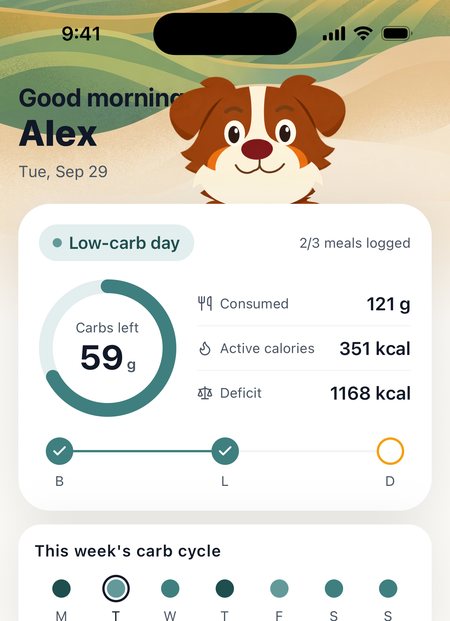
Carbo-AI Home: today's carb-day chip, carbs left, and what you've eaten, burned and the gap

A plan, not just a log.

More carbs on training days, fewer on rest days. That's carb cycling — and Carbo-⁠AI sets each day's target for you.

High-carb dayMediumLow

Carbo reacts.

He's the app's mood — not a mascot glued to the corner.

With you

Peeks over your Home card — breathes, blinks, stays out of your way.

Counting

While the AI reads your plate.

Cheers

When you unlock an achievement.

High five

For the big ones, like a 30-⁠day streak.

Carbo nudges, never nags.

At most one reminder a day, only for a meal you haven't logged — and if reminders aren't helping, Carbo goes quiet.

Local notifications only — nothing leaves your phone.

It's an estimate. That's fine.

No app can weigh food through a camera, so treat the number as an estimate, not a lab result. Carb cycling doesn't need a lab — each day has a target range, not a single number to hit. And when Carbo gets it wrong, fix it before you save — one tap.

Chicken rice · 220 g
Tap any number to edit before saving
Carbs 62 g Protein 35 gFat 6 g

Apple Health, read-only.

Carbo-⁠AI reads energy, steps and weight to size your carb days. Home shows Apple Health's active calories and your deficit — everything you've burned so far today, minus what you've eaten. It never writes anything back.

Consumed121 g
Active calories351 kcal
Deficit1168 kcal

Burned calories from Apple Health · nothing is written back

Carbo-AI Pro

Everything the app does, on a subscription billed by Apple. Cancel anytime.

  • AI photo recognitionSnap a meal, get its carbs (fair use: 50/⁠day).
  • Smart carb-day adjustmentDaily targets tuned with your Apple Health data.
  • Cloud backup & restoreKeep your log safe and move it to a new phone.
  • Full progress & trendsYour complete history, not just this week.

Questions

Is Carbo-⁠AI free?

Carbo-⁠AI is free to download. Using it requires a Carbo-⁠AI Pro subscription, billed through the App Store. If a free trial is offered, its terms are shown before you buy. Cancel anytime.

How accurate is the carb estimate?

It's an estimate: the app recognises the food, estimates the portion and looks up its nutrition. Treat it as a starting point and edit it before you save when it's off. Carb cycling aims at a daily range, not one exact number, so a close estimate is enough.

What happens to my photos?

Your photo goes to our servers and on to a third-party AI provider to recognise the food. We don't store meal photos on our servers. The provider doesn't use them to improve its products, and may keep them for a limited period solely to detect abuse. Photos taken with the in-app camera stay only in the app's temporary storage on your phone.

Does it work on Android?

Not yet — Carbo-⁠AI is iPhone-only.

How do I cancel?

iPhone Settings → your name → Subscriptions → Carbo-⁠AI → Cancel. Deleting the app doesn't cancel the subscription.

How do I delete my account?

In the app: Profile tab → gear icon → Settings → Delete account. Your server-side data is deleted immediately; copies in our encrypted backups expire within 30 days.

Which Apple Health data does it read?

Active energy, resting energy, steps, weight, body fat and workouts — read-only, never written back.


Ready when your next meal is.

Coming soon to the App Store